Wedding QR code for photos
One QR code. Every guest photo.
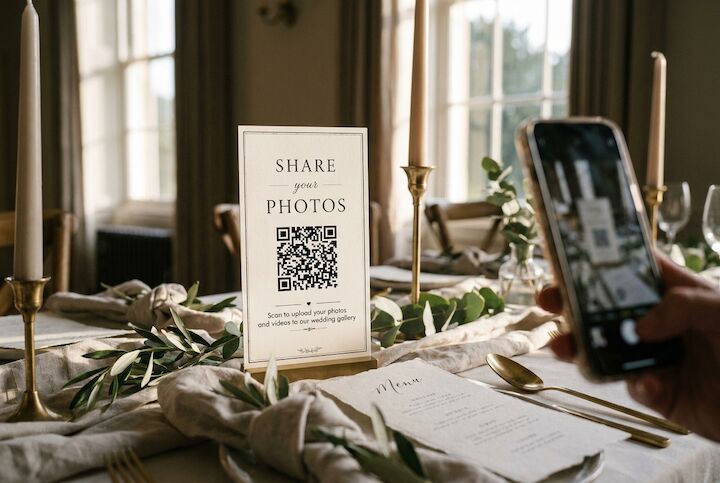
Guests scan the card on their table and their photos land in your private gallery. No app, no account, ten seconds.
Wedding QR code for photos
Guests scan the card on their table and their photos land in your private gallery. No app, no account, ten seconds.
Sign up, add your names and wedding date, and personalise your gallery page. Your unique QR code and sharing link are generated instantly.
Download your QR code as a high-resolution image and add it to whatever you're printing - table cards, welcome signs, menus, the order of service, even napkins if you're feeling creative. We provide the QR code in formats that work with any printer or designer.
On the day, guests point their phone camera at the QR code. A browser page opens - no app download, no sign-up form - and they can upload photos and videos directly from their camera roll. It works on every smartphone: iPhone, Android, old or new.
Every upload lands in your private gallery, organised and searchable. Our facial recognition automatically groups photos by the people in them, so you can find every shot of your mum, your flower girl, or your best man without scrolling through hundreds of images.
The difference between collecting 50 guest photos and 500 is almost entirely about visibility. The more places your QR code appears, the more guests will scan it.
This is the most effective placement. A small card on each table means guests see it while they're sitting, chatting, and reaching for their phones between courses. It's right there when the impulse strikes.
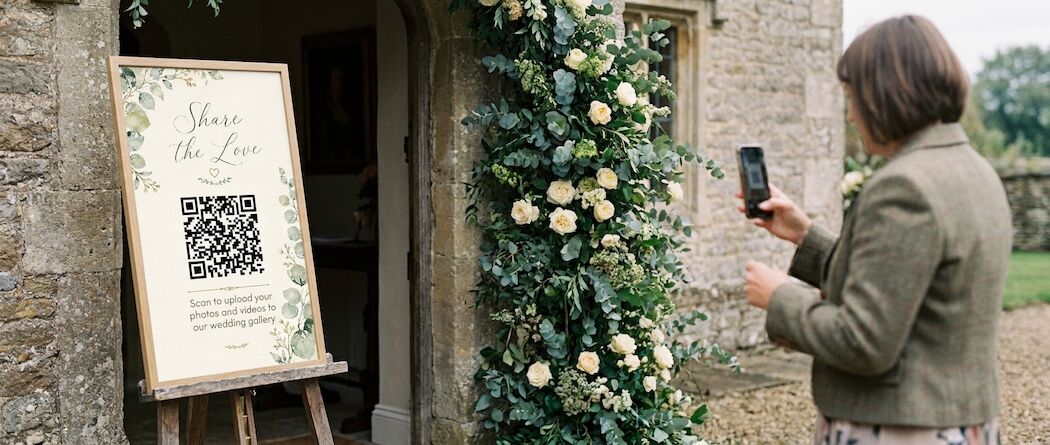
A framed sign catches guests as they arrive. Early uploads - pre-ceremony getting-ready shots, arrival photos, the venue looking pristine - set the tone and encourage others to contribute.
Guests often hold onto these throughout the ceremony. Including the QR code here means it's in their hands at one of the most photo-heavy moments of the day.
People gather at the bar, check their phones, see the code and scan it. Some of the best candid photos come from these casual in-between moments.
If you've set up a photo booth or selfie station, the QR code belongs here. Guests are already in "photo mode" - make it easy for them to upload what they've just taken.
Later in the evening, when the dancing starts and phones come out for videos, a visible QR code catches the party-hour content that's often the most fun to look back on.

You'll get photos from about three people, all in different formats, all on different timelines. The rest will mean to send them and never get round to it.
Requires typing a URL correctly (or finding an old email), signing into an account, and navigating a file system. Too many steps for most guests to bother with, especially after a few drinks.
Works for close friends but falls apart with larger groups. Photos get compressed, the conversation gets chaotic, and half your guests won't want to be added to yet another group chat.
Only captures photos from Instagram users who remember the hashtag and post publicly. Private accounts are invisible, and you're trusting a social media platform to store your memories.
One scan, one tap, photos uploaded. Works on every phone, requires nothing from guests except pointing their camera. Photos arrive in full quality in a private gallery with facial recognition sorting. It's the path of least resistance.
Your QR code should feel like part of your wedding, not an afterthought stuck on a generic printed card.
For the full walkthrough - wording that gets guests scanning, where to place your cards, and the mistakes that quietly cost couples photos - read our wedding QR code setup guide.
5 out of 5
Left QR code on tables and when we woke up the next morning we were overwhelmed with the amount of photos and videos. We can now re-live our wedding not just through the formal wedding photographer, but through the eyes of our guests too.
5 out of 5
I put the QR code on the table name tags and so far have 454 pictures. I can even tag a person and it will show me the photos with them in. It captures those unposed natural moments a photographer misses.
5 out of 5
No apps required just scan then select and upload. Couldn't be easier and so quick to set up. Absolutely recommend.
5 out of 5
Must do for any event. Easy to set up an album and produce QR code cards to give to guests. You get to see all your guests points of view of the event.
No. Every modern smartphone can scan QR codes using the built-in camera app. When guests scan your Gather & Group QR code, their browser opens directly to your upload page. No app download, no account creation.
You can download your QR code as a high-resolution image and incorporate it into any design. The QR pattern itself needs to stay intact for scanning to work, but you can frame it, add colours around it, and place it within any layout.
Guests can take photos as normal and upload them later when they have a connection. Many of the best uploads come the day after the wedding when guests are home on WiFi.
Unlimited. There's no cap on the number of photos or videos, and no limit on how many guests can upload. Everyone at your wedding can contribute.
Yes - one QR code works for everyone. You don't need individual codes or guest-specific links. Print one code and put it everywhere.
Yes. One code collects photos across every event, and you can sort them into an album for each one, so the hen do sits apart from the wedding day.
Set up in minutes. Unlimited guest uploads. From $39, or everything included for $67.
Start your free trial